

The ATI Proctor Process Guide outlines the steps for faculty to administer secure, remote, or in-person assessments using the Proctorio platform. Key steps include completing Proctor Certification, selecting assessments, agreeing to terms, checking equipment, and managing student check-in.

ALL PROCTORED
ASSESSMENTS
ONLINE VERSION
(excludes TEAS)
NURSING
EDUCATION
ATI Proctor Process Guide
Y
OU MAY BEGIN

Rev. 06/21
Copyright ©2021 Assessment Technologies Institute, L.L.C. All rights reserved.
i
Proctor Process Guide – Other Online
Table of Contents
Before You Proctor ..................................................................................................... 1
STEP ONE: Before Examinees Arrive ............................................................................ 3
STEP TWO: Examinee Check In .................................................................................. 10
STEP THREE: Starting the Exam ................................................................................. 12
STEP FOUR: Read the Proctor Script .......................................................................... 14
STEP FIVE: During the Exam ...................................................................................... 17
STEP SIX: After the Exam .......................................................................................... 23
Frequently Asked Questions (FAQs) .......................................................................... 25
FAQ 1: How do I Assign Assessments to a Proctor? ................................................... 26
FAQ 2: How do I Create a Seating Chart? (optional) .................................................. 27
FAQ 3: Challenges to Questions – Product Inquiry Process ....................................... 27
FAQ 4: Bring Your Own Device (BYOD) Best Practices................................................ 28
FAQ 5: Accommodations for Examinees with Disabilities .......................................... 29
FAQ 6: ATI Remote Proctoring with Proctorio ............................................................ 30
FAQ 7: Test Misconduct and Testing Irregularities Guidelines ................................... 31
FAQ 8: After-Hours Support Request Form ................................................................ 33
Rev. 06/21
Copyright ©2021 Assessment Technologies Institute, L.L.C. All rights reserved.
1
Proctor Process Guide – Other Online
Before You Proctor
Are you ready to proctor an assessment?
• Check your status. Are you a proctor/instructor/director? If you do not have the correct
status, an authorized instructor- or director-level representative from your institution
must contact contact your ATI Customer Service representative or your Client Account
Manager by e-mail at least three business days prior to testing to request a status
change.
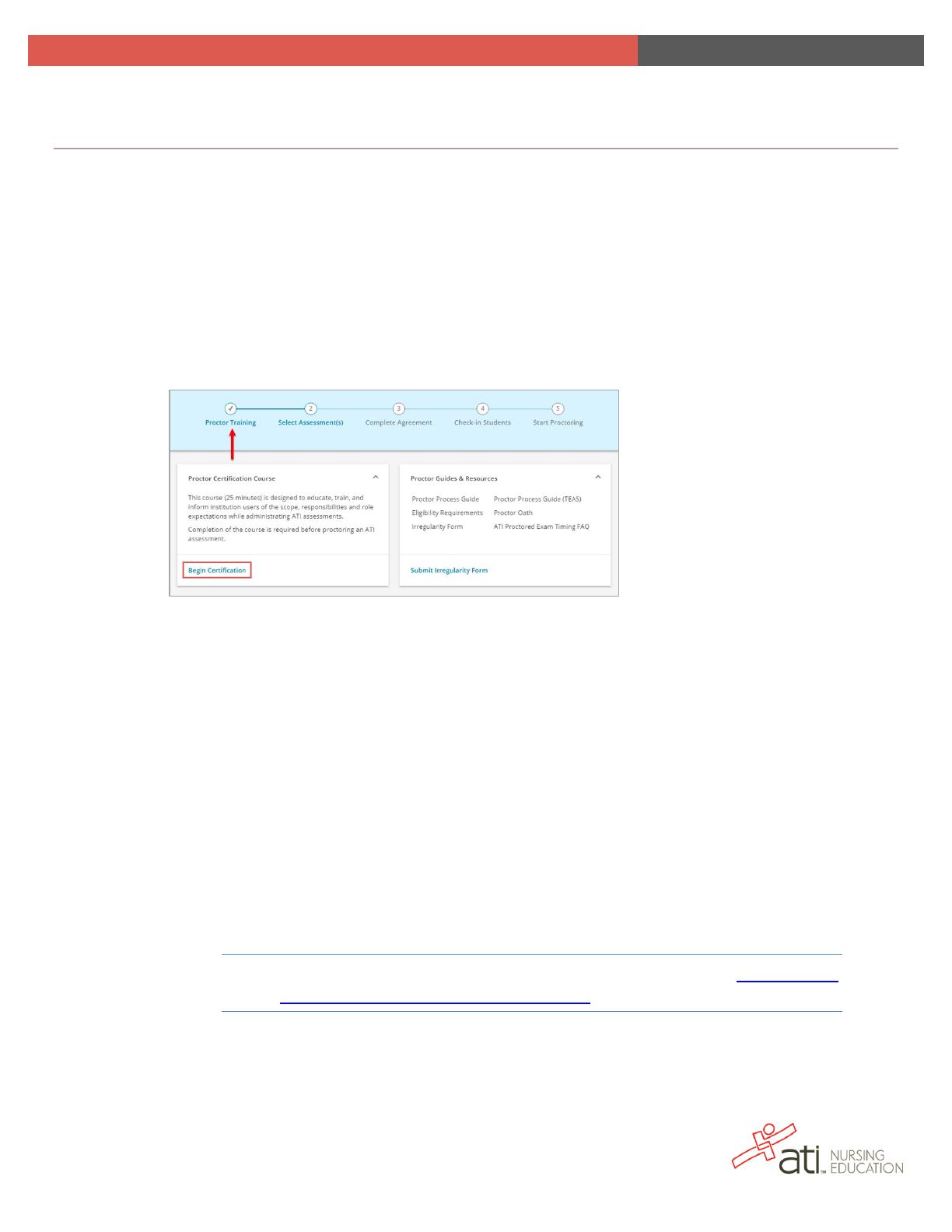
• Have you completed the preliminary paperwork and training? You can access
everything you need from the Proctor page.
o Proctor Guides & Resources – Sign the Proctor Oath and read the Proctor
Process Guide(s).
o Proctor Certification Course – You must complete this course before you
proctor an assessment. Click Begin Certification to access the course. You
must retake the course every year; each time you complete the course, the date
of your renewal displays in the lower right corner of the pane.
• Do you have your log-in information, consisting of your user name and password?
• Do you know the assessment to be proctored?
o If you are a Proctor – All assessments that are available for you to proctor
display. If you have any issues getting started, call ATI at 800-667-7531 at least
one day in advance of the assessment.
o If you are a Director or Instructor – Navigate to the Products tab to view the
assessments to be proctored.
Note: Directors can assign a Proctor to an assessment. (See FAQ 1: How
do I Assign Assessments to a Proctor.)