This document serves as a comprehensive guide on Smart System Automation, specifically focusing on home automation. It covers essential components, system architecture, and design considerations for implementing home automation systems. Key topics include smart devices, hubs, mobile applications, and various communication technologies like Wi-Fi and Bluetooth. The document also discusses the advantages and disadvantages of home automation, security and privacy concerns, and applications in everyday life. It provides insights into energy management techniques and the significance of smart appliances. This guide is structured to facilitate understanding for both beginners and advanced users interested in enhancing their home automation systems.
/ 19

EC3V36 Smart System Automation Unit II Home Automation
1
UNIT II HOME AUTOMATION 9
Home Automation – System Architecture - Essential Components- Design Considerations: Control
Unit, Sensing Requirements, Communication, Data Security.
System Architecture:
Home Automation is a system that allows users to control various appliances of varying kinds and
also makes controlling of home appliances easier and saves energy. Nowadays home automation is used
more and more. On the other hand, it provides increased comfort especially when everyone is busy with
their work. Home automation installed in houses does not only increase comfort but also allows centralized
control of heating, ventilation, air-condition, and lighting. Hence, they contribute to an overall cost
reduction and also useful in energy saving which is certainly the main problem today.
In present years, wireless systems like Wi-Fi, Bluetooth have become more and more common in-
home networking. Also in home automation, the use of wireless technologies gives several advantages that
could not be achieved using a wired network only.
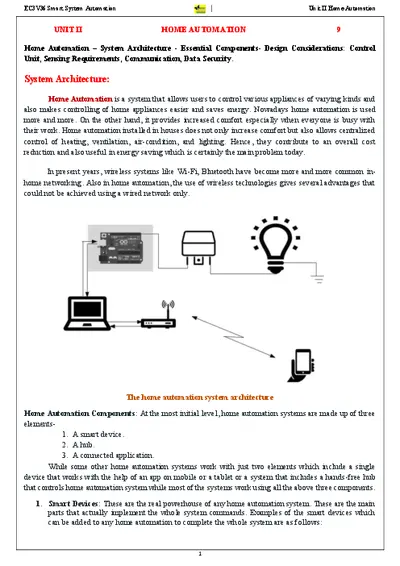
The home automation system architecture
Home Automation Components: At the most initial level, home automation systems are made up of three
elements-
1. A smart device.
2. A hub.
3. A connected application.
While some other home automation systems work with just two elements which include a single
device that works with the help of an app on mobile or a tablet or a system that includes a hands -free hub
that controls home automation system while most of the systems work using all the above three components.
1. Smart Devices: These are the real powerhouse of any home automation system. These are the main
parts that actually implement the whole system commands. Examples of the smart devices which
can be added to any home automation to complete the whole system are as follows:

EC3V36 Smart System Automation Unit II Home Automation
2
➢ Security Devices: This includes security cameras, smart locks.
➢ Home Appliances: Smart refrigerators, washing machines, dishwashers, and ovens already exist.
➢ Smaller Appliances: As automatic coffee pots and electric kettle have been also around for a while too
➢ Climate Controls: Climate control system with energy management systems
➢ Smart Thermostats.
➢ Entertainment Pieces: Entertainment includes smart TVs, wireless speakers, and film projectors
➢ Health Care Devices: Smart humidifiers and smart scales are two common examples of health
care devices.
➢ Lighting Controls: They include dimmers, light bulbs, light strips, and switches, etc.
➢ A high-speed internet plays an important role in smooth connectivity and also plays an important
reliable performance between Wi-Fi-enabled devices.
2. Smart Hubs: The hub is the controlling center of the home automation system. It is the piece that
connects your individual devices and helps them talk to one another.
3. Mobile Apps: The mobile application provides an interface between the user and the system. It gives
you the ability to control or monitor your smart devices remotely. They can be easily downloaded with
the help of a provided application on mobile and provide access control of the system, power controls,
timer access, and many more things.
Centralized IoT-based smart home architecture
How Home Automation Works?
Home automation works with the help of a network of devices that are connected to the Internet
through different communication systems like Wi-Fi, Bluetooth, ZigBee, and others. Through these devices
can be managed remotely through controllers through an app. Many of these IoT devices have sensors that
monitor changes in motion, temperature, and light so the user can gain information about the device’s
surroundings.

EC3V36 Smart System Automation Unit II Home Automation
3
Three steps are followed in home automation as follows:
1. Monitoring: This means keeping the control of the system using an app on a device remotely.
2. Control: This means that the system can be controlled remotely from anywhere through the app by the user.
3. Automation: Automation means making almost all devices automatic for making it a better system.
Applications: Some of the most common applications of home automation are as follows-
➢ Heating, ventilation, and air conditioning.
➢ Lighting control system.
➢ Occupancy-aware control system.
➢ Leak detection.
➢ Smoke sensors.
➢ Indoor positioning systems.
➢ Home automation for the elderly and disabled.
➢ Air quality control.
➢ Smart Kitchen.
➢ Connected Cooking.
➢ Voice control devices like Amazon Alexa or Google Home used to control home appliances or systems etc.
Security And Privacy Concern: The security and privacy of any home automation system are at the top
level for keeping the working of home automation smoothly. So, there are some steps or knowledge it can
be achieved easily and vastly which are as follows:
➢ Privacy Policy: Read the privacy policy carefully and know each and every point about how they
share it and sell it to third parties.
➢ Naming of Router: Be sure to give your router a name except for the name it came with when get
purchased.
➢ Encryption: Select an end-to-end encrypted method for your Wi-Fi, like WPA2.
➢ WiFi Password: Make separate passwords for each Wi-Fi connection to your devices.
➢ Separate WiFi Network: For the most security for your IoT devices use a separate Wi-Fi network
for IoT devices only. This will also create faster Internet speeds all around.
➢ Password: Make your home automation password protected. Choose a strong password for the
Wi-Fi network.
➢ Device settings: Devices have features enabled by default that are not necessarily required so, turn
it off when these features are not in use like Wi-Fi, Bluetooth, and knowing your location i.e.
Location Tracking feature.
➢ Software Updates: The software update is also the most important step in security because it
performs all the steps needed for security or privacy concerns.
➢ Authentication: Using a two-factor authentication system will help a lot because by this the
password or any kind of verification first comes to your mobile phone then only any application gets
opened.
➢ VPN: It stands for Virtual Private Network. If VPN is being used or any other public network for
connection, then hide your IP address.

Loading document...
/ 19
Upload to Download
Every 3 documents you upload earns 1 download credit.
You have uploaded 0 documents. Upload 3 more to earn a download.
Upload Documents
End of Document
186
Report this document
Why are you reporting this content?
Embed document
* The code will be updated based on your changes.
Upload to Print
Every 3 documents you upload earns 1 print/download credit.
You have uploaded 0 documents. Upload 3 more to earn a credit.
Upload Documents