This document is a comprehensive worksheet for exploring the carbon cycle using the Gizmo simulation. It includes activities on carbon pathways, human impacts, and modeling atmospheric changes. Designed for educational purposes, it facilitates understanding of key concepts in environmental science.
/ 7

2018
Name: Date:
Student Exploration: Carbon Cycle
Vocabulary: atmosphere, biomass, biosphere, carbon reservoir, carbon sink, fossil fuel,
geosphere, greenhouse gas, hydrosphere, lithosphere, photosynthesis
Prior Knowledge Questions (Do these BEFORE using the Gizmo.)
In the process of photosynthesis, plants take in carbon dioxide (CO
2
) from the atmosphere and
water (H
2
O) from the soil. Using the energy of sunlight, plants build molecules of glucose
(C
6
H
12
O
6
) and oxygen (O
2
).
1. How do plants on Earth affect the amount of carbon in Earth’s atmosphere?
2. Animals eat plants and produce carbon dioxide and water. How do animals affect the
amount of carbon in Earth’s atmosphere?
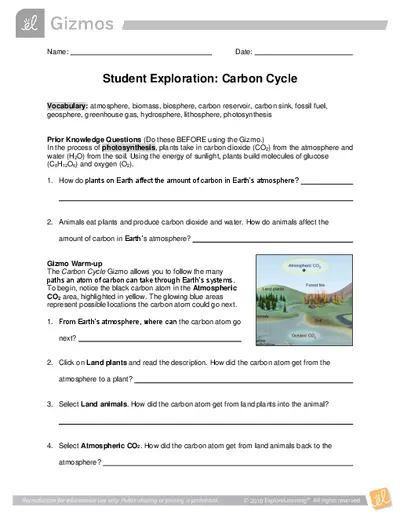
Gizmo Warm-up
The Carbon Cycle Gizmo allows you to follow the many
paths an atom of carbon can take through Earth’s systems.
To begin, notice the black carbon atom in the Atmospheric
CO
2
area, highlighted in yellow. The glowing blue areas
represent possible locations the carbon atom could go next.
1. From Earth’s atmosphere, where can the carbon atom go
next?
2. Click on Land plants and read the description. How did the carbon atom get from the
atmosphere to a plant?
3. Select Land animals. How did the carbon atom get from land plants into the animal?
4. Select Atmospheric CO
2
. How did the carbon atom get from land animals back to the
atmosphere?

2018
Activity A:
Carbon pathways
Get the Gizmo ready:
Click Reset.
Introduction: Earth can be divided into four systems. The atmosphere is the air above Earth’s
surface. The hydrosphere is composed of all of Earth’s water. The geosphere is the rocky,
non-living part of Earth. The biosphere consists of all living things, including people. Some
scientists use the term “anthroposphere” to describe everything made or modified by humans.
Question: How does carbon move between the atmosphere, hydrosphere, biosphere, and
geosphere?
1. Explore: Use the Gizmo to create a path for carbon that begins and ends in the atmosphere.
Fill in the steps in the path below. Then, label each location with the system it represents.
Finally, summarize very briefly how the carbon atom got to that location.
Carbon path
System
How it got there
Atmospheric CO
2
Atmosphere
Atmospheric CO
2
comes from volcanoes,
burning fossil fuels, and other sources.
2. Create: Click Reset. Use the Gizmo to create a path in which the carbon atom goes from the
atmosphere to the hydrosphere, biosphere and geosphere. Describe each transition briefly.
Atmosphere
Hydrosphere
Biosphere
Geosphere
Atmospheric CO
2
Volcanoes, burning
fossil fuels, and
other sources.
(Activity A continued on next page)

2018
Activity A (continued from previous page)
3. Explore: Use the Gizmo to create three more carbon paths, each starting and ending in the
atmosphere. Label each location with A for atmosphere, B for biosphere, G for geosphere,
or H for hydrosphere. (You can also use P for anthroposphere if you like, or just include it in
the biosphere.)
Path 1:
Path 2:
Path 3:
4. Explain: Based on the Gizmo, explain how the following transitions might take place:
A. Describe at least two ways that carbon can get from a land plant to the atmosphere.
B. Describe at least two ways that carbon can get from the atmosphere to the
hydrosphere.
C. Can you find two ways that carbon can get from the ocean to the lithosphere? (The
lithosphere is the rigid layer of the Earth, including the crust and part of the mantle.)
D. Describe at least two ways that carbon can get from seashells to the atmosphere.
Loading document...
/ 7
Upload to Download
Every 3 documents you upload earns 1 download credit.
You have uploaded 0 documents. Upload 3 more to earn a download.
Upload Documents
End of Document
303
Report this document
Why are you reporting this content?
Embed document
* The code will be updated based on your changes.
Upload to Print
Every 3 documents you upload earns 1 print/download credit.
You have uploaded 0 documents. Upload 3 more to earn a credit.
Upload Documents